
Controls - Notes
Notes
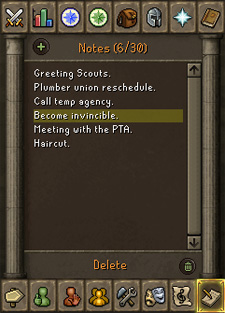
 To open your notes interface, click the icon in the bottom-right of your screen. This remarkably simple system enables you to leave up to 30 notes for yourself, each of which can be up to 50 characters long.
For further customisation, you can right-click any note to give you the option to edit it or to change the colour of the text.
To add a note, click the 'plus' symbol in the top-left; to delete a note, select it and click the 'Delete' bar. If you'd like to delete all of your notes, you can right-click on the delete bar and select 'Delete all'.
Important Note
You should NOT use this to store PIN numbers, passwords, personal information or any other sensitive information. The note-taking feature has been made unavailable to those players who are most at risk of revealing personal information.
The best use for the note interface is to remind yourself of your goals, dates and times for clan events, and so on.

|
More articles in Controls
|
|
|
Further Help
If this article does not help you, you may find the following sections of the RuneScape site helpful:
|
|