
Controls - Statistics
Introduction
![[image]](../../img/main/kbase/menu_icons/statistics_control1.gif) To access your character's current statistics, click on the statistics icon.
To access your character's current statistics, click on the statistics icon.
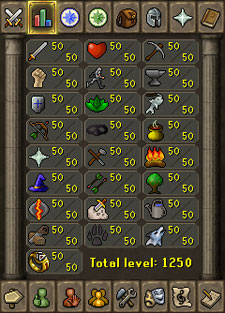
A display will appear, with icons for every single skill.
Your total skill level is displayed underneath your individual skill levels (your Quest Points are displayed under the quest tab, and your combat level is displayed under the combat tab).
In the table below you will see all of the skill icons, with the skill name and links to their related skill guides. The table below lists the icons in the order they appear in the window, starting from top row, moving left to right and then downwards.
Name |
Image |
Name |
Image |
Name |
Image |
||
| Attack | ![[image]](../../img/main/kbase/menu_icons/attack1.gif) |
Constitution | ![[image]](../../img/main/kbase/menu_icons/constitution.gif) |
Mining | ![[image]](../../img/main/kbase/menu_icons/mining1.gif) |
||
| Strength | ![[image]](../../img/main/kbase/menu_icons/strength1.gif) |
Agility | ![[image]](../../img/main/kbase/menu_icons/agility1.gif) |
Smithing | ![[image]](../../img/main/kbase/menu_icons/smithing1.gif) |
||
| Defence | ![[image]](../../img/main/kbase/menu_icons/defence1.gif) |
Herblore | ![[image]](../../img/main/kbase/menu_icons/herblore1.gif) |
Fishing | ![[image]](../../img/main/kbase/menu_icons/fishing1.gif) |
||
| Ranged | ![[image]](../../img/main/kbase/menu_icons/ranged1.gif) |
Thieving | ![[image]](../../img/main/kbase/menu_icons/thieving1.gif) |
Cooking | ![[image]](../../img/main/kbase/menu_icons/cooking1.gif) |
||
| Prayer | ![[image]](../../img/main/kbase/menu_icons/prayer1.gif) |
Crafting | ![[image]](../../img/main/kbase/menu_icons/crafting1.gif) |
Firemaking | ![[image]](../../img/main/kbase/menu_icons/firemaking1.gif) |
||
| Magic | ![[image]](../../img/main/kbase/menu_icons/magic1.gif) |
Fletching | ![[image]](../../img/main/kbase/menu_icons/fletching1.gif) |
Woodcutting | ![[image]](../../img/main/kbase/menu_icons/woodcutting1.gif) |
||
| Runecrafting | ![[image]](../../img/main/kbase/menu_icons/runecrafting1.gif) |
Slayer | ![[image]](../../img/main/kbase/menu_icons/slayer1.gif) |
Farming | ![[image]](../../img/main/kbase/menu_icons/farming1.gif) |
||
| Construction | ![[image]](../../img/main/kbase/menu_icons/construction1.gif) |
Hunter | ![[image]](../../img/main/kbase/menu_icons/hunter1.gif) |
Summoning | ![[image]](../../img/main/kbase/menu_icons/summoning1.gif) |
||
| Dungeoneering | ![[image]](../../img/main/kbase/menu_icons/dungeoneering.gif) |
Experience
![[image: skills interface showing experience levels]](../../img/main/kbase/menu_icons/tool_tip.gif "skills interface showing experience levels") To determine your current experience points in a specific skill and how many experience points mark the beginning of the next level, move your mouse pointer over the icon for that skill. A small pop-up will appear, showing the current state of that skill. The number of experience points you have earned is displayed at the top of the pop-up window, while the number of experience points for the next level is displayed at the bottom.
To determine your current experience points in a specific skill and how many experience points mark the beginning of the next level, move your mouse pointer over the icon for that skill. A small pop-up will appear, showing the current state of that skill. The number of experience points you have earned is displayed at the top of the pop-up window, while the number of experience points for the next level is displayed at the bottom.
In this image, the mouse pointer is over the Runecrafting skill. At the moment, the character has earned 101,333 experience points in Runecrafting and will get to the next level in Runecrafting when they gain or pass 111,945 experience points. The text also explains that the character needs a further 10,612 experience points to get to level 51.
Skill Guides
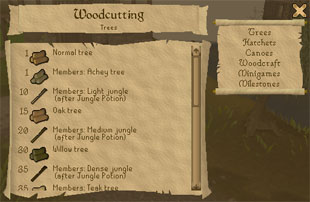
The interface shows things that can be done within that skill, as well as the level required to perform them. Items that are for members only will have Members: written before their names.
Click the text on the right-hand side to see what aspects of that skill you can or cannot perform. In the image above, clicking on "Hatchets" will display a list of all the hatchets and the level required to use them.
Skill Targets
For every skill, you are also able to set yourself a personal target to work towards. This target can be either a certain level or a specific amount of XP. Once a target has been set, a progress bar will be added to that skill's pop-up window (when you move your mouse over the icon for a skill). You will receive a message in the chat window once you reach any target you have set.
To set a skill target, simply right-click on a skill's icon and select either 'Set Level Target' or 'Set XP Target'. You can set a target for every single skill if you so desire, of either type. To clear a target you have set, simply right-click on a skill's icon and select 'Clear Target' to remove it from that skill.

|
More articles in Controls
|
|
|
Further Help
If this article does not help you, you may find the following sections of the RuneScape site helpful:
|
|